
.png)
Description
Download Becca – AI‑Powered LinkedIn Content Generator for Freelancers
Overview – Why Becca Is the Must‑Have Tool for LinkedIn Success
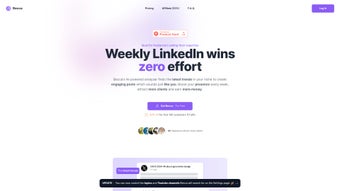
Becca is an AI‑driven web application built specifically for freelancers who want to dominate LinkedIn without spending hours drafting posts. By analyzing your existing content, tone, and niche‑specific trends, Becca crafts personalized, engaging updates that feel authentically yours. The platform’s core promise is simple: deliver a steady stream of high‑quality LinkedIn posts directly to your WhatsApp, so you can focus on client work while your personal brand thrives. Becca’s subscription model guarantees continuous access to the latest AI models, trending insights, and performance analytics, ensuring you stay ahead of the competition. Whether you’re a graphic designer, copywriter, or software developer, Becca adapts to any professional voice, turning your LinkedIn presence into a client‑attracting engine.
What truly sets Becca apart is its blend of three powerful capabilities: AI‑generated copy that mirrors your unique voice, real‑time niche research that surfaces the topics your audience cares about, and seamless delivery through WhatsApp, the messenger most freelancers already use. This combination eliminates the dreaded “writer’s block” and removes the need for separate content calendars or scheduling tools. Moreover, Becca’s secure, cloud‑based architecture means you never have to install bulky software; everything runs in a browser, keeping your device clean and your data safe. The result is a frictionless workflow that converts LinkedIn engagement into measurable revenue growth.
In today’s hyper‑competitive freelance market, consistency and relevance are non‑negotiable. Becca not only guarantees a regular posting cadence but also optimizes each post for maximum reach, using AI‑backed hashtag suggestions and optimal posting times. For freelancers who understand the value of personal branding, Becca offers a cost‑effective, time‑saving solution that turns LinkedIn from a passive network into a proactive lead‑generation channel.
Key Features – What Becca Delivers to Boost Your LinkedIn Game
- AI‑Generated Posts Tailored to Your Voice: Becca scans your previous LinkedIn updates, blog articles, and portfolio content to learn your tone, vocabulary, and style, then produces new posts that sound unmistakably like you.
- Real‑Time Trend Research: The platform continuously monitors industry news, hashtags, and competitor activity to surface the hottest topics in your niche, ensuring your content stays relevant.
- WhatsApp Delivery System: Finished posts are sent straight to your WhatsApp number, ready for a quick copy‑paste into LinkedIn, eliminating the need for a separate dashboard.
- Content Calendar & Scheduling Suggestions: Becca recommends optimal posting days and times based on LinkedIn analytics, helping you hit peak engagement windows.
- Performance Analytics Dashboard: Track likes, comments, and click‑through rates of each AI‑generated post, and let the system refine future content based on what works best.
- Multi‑Language Support: Write in English, Spanish, French, or German; Becca’s language model adapts to multiple languages without sacrificing tone.
- Secure Cloud Infrastructure: All data is encrypted in transit and at rest, complying with GDPR and CCPA standards, giving you peace of mind about privacy.
- Regular Model Updates: Subscribers receive automatic upgrades to the latest AI models, ensuring content stays fresh and algorithm‑friendly.
Beyond the headline features, Becca also offers a suite of auxiliary tools that enhance the overall user experience. For instance, the built‑in hashtag generator suggests up to 15 relevant tags per post, ranked by engagement potential. The “Idea Bank” stores past prompts and successful posts, allowing you to recycle high‑performing concepts with a single click. Additionally, Becca integrates with LinkedIn’s API (where permitted) to fetch real‑time metrics, feeding them back into the AI to improve future suggestions.
All of these capabilities are delivered through a clean, responsive web interface that works on any modern browser. The design prioritizes simplicity: a single “Generate” button, a preview pane, and a “Send to WhatsApp” toggle. Even users with limited technical expertise can master the workflow within minutes, making Becca an ideal solution for freelancers who value efficiency as much as effectiveness.
Installation & Usage – Getting Started with Becca in Minutes
Step‑by‑Step Setup
- Visit the official Becca website and click the “Start Free Trial” button.
- Create an account using your email address or link your Google/Apple ID for single‑sign‑on convenience.
- Verify your WhatsApp number – a one‑time code will be sent to ensure secure delivery of generated posts.
- Complete the onboarding questionnaire: provide links to your LinkedIn profile, recent posts, and any portfolio pieces you’d like the AI to study.
- Choose a subscription plan (monthly or annual). All plans include unlimited post generation and access to the analytics dashboard.
Daily Workflow
Once set up, using Becca is straightforward. Log in to the dashboard, select “Create New Post,” and specify the type of content you need (e.g., thought leadership, case study, promotional offer). You can optionally add a keyword or a brief prompt to guide the AI. Becca then produces three variations within seconds. Review the drafts, edit if necessary, and hit “Send to WhatsApp.” Within moments, the selected version appears in your chat, ready for you to copy and paste into LinkedIn.
The platform also supports bulk generation. If you need a week’s worth of content, simply select “Generate Series,” set the desired number of posts, and let Becca fill the calendar. The generated posts are automatically timestamped, and the analytics tab will later show performance metrics for each entry, helping you identify which tone or topic resonates most with your audience.
Troubleshooting & Support
Becca offers a built‑in help center with searchable articles, video tutorials, and a community forum where freelancers share best practices. For urgent issues, a live chat widget is available 24/7. Common problems—such as delayed WhatsApp delivery or AI output that feels off‑tone—are typically resolved within minutes by the support team.
Because Becca is a cloud‑based service, there’s no software to install on your computer, making updates seamless. When a new AI model is released, the platform automatically switches over, and you receive a brief in‑app notification highlighting the enhancements.
Compatibility – Where and How Becca Works
Becca is designed as a platform‑agnostic web application, meaning it runs smoothly on any operating system that supports a modern web browser. Whether you’re on Windows 10/11, macOS Ventura, a Linux distro, or even a Chromebook, you’ll experience the same fast, responsive interface. The only requirement is an internet connection and a recent version of Chrome, Firefox, Edge, or Safari.
Because the content delivery relies on WhatsApp, you’ll need the WhatsApp mobile app (iOS 13+ or Android 9+) or WhatsApp Web installed on your desktop. The integration works via WhatsApp’s standard messaging protocol, so no additional plugins or API keys are required. If you prefer to receive posts via email instead of WhatsApp, Becca also offers an optional email delivery setting that can be toggled in the user preferences.
For freelancers who travel frequently, the web‑based nature of Becca ensures you can access your content generator from any device—laptop, tablet, or even a smartphone browser. All personal data, including your LinkedIn profile analysis and generated drafts, is stored securely in the cloud, encrypted with AES‑256, and synchronized across devices in real time.
Becca complies with major privacy regulations (GDPR, CCPA), and the service explicitly states that it does not sell or share your personal data with third parties. The only data shared externally is anonymized usage statistics that help improve the AI models, and this can be opted out of in the privacy settings.
Pros and Cons – A Balanced Look at Becca’s Strengths and Weaknesses
Pros
- AI generates posts that accurately mimic your personal tone, saving time on copywriting.
- Real‑time niche trend analysis keeps content fresh and relevant.
- WhatsApp delivery streamlines the posting process for freelancers on the go.
- Comprehensive analytics dashboard lets you measure post performance and refine strategy.
- Secure, cloud‑based platform works across Windows, macOS, Linux, and mobile browsers.
- Regular AI model updates ensure you always have the latest language capabilities.
- Multi‑language support expands reach for non‑English speaking freelancers.
Cons
- Subscription‑only model may be a barrier for freelancers on a very tight budget.
- Reliance on WhatsApp means users without the app must switch to email delivery.
- Initial onboarding requires providing access to existing LinkedIn content, which some may find intrusive.
- AI may occasionally produce generic statements that need minor tweaking.
- No native scheduling feature; posts still need manual publishing on LinkedIn.
Overall, the benefits of accelerated content creation and data‑driven insights outweigh the minor drawbacks. For freelancers who value consistency and are comfortable with a modest monthly fee, Becca offers a clear ROI through increased engagement and client acquisition.
Frequently Asked Questions
-
How does Becca learn my personal writing style?
During onboarding, you connect your LinkedIn profile and optionally upload recent blog posts or portfolio pieces. Becca’s AI analyzes word choice, sentence length, and recurring themes to build a style model. This model is then used to generate new posts that sound like you, while still adhering to LinkedIn’s best practices.
-
Can I use Becca on a mobile device?
Yes. Becca’s web interface is fully responsive, and you can generate posts directly from a smartphone browser. The generated drafts are sent to your WhatsApp, which you already have on your phone, making the workflow seamless on mobile.
-
Is there a free trial or a free tier?
Becca offers a 7‑day free trial with full access to all features. No credit card is required; you can cancel anytime before the trial ends. After the trial, you’ll need to select a paid subscription to continue using the service.
-
What subscription plans are available?
There are two main plans: a monthly plan at $19.99 per month and an annual plan at $199 per year (equivalent to $16.58/month). Both include unlimited post generation, analytics, and WhatsApp delivery. The annual plan offers a two‑month discount.
-
How secure is my data on Becca?
Becca uses SSL/TLS encryption for data in transit and AES‑256 encryption at rest. The platform complies with GDPR and CCPA, and you can delete your account and all associated data at any time from the privacy settings.
Conclusion – Is Becca Worth the Investment?
For freelancers who understand that a thriving LinkedIn presence is a cornerstone of modern business development, Becca delivers a compelling blend of AI creativity, trend intelligence, and ultra‑convenient delivery. The tool eliminates the time‑draining grind of daily copywriting while ensuring each post aligns with your personal brand and the latest industry conversations. Although it requires a modest subscription fee, the measurable boost in engagement, the reduction in content‑creation workload, and the built‑in analytics that guide future strategy combine to offer a strong return on investment.
If you’re ready to transform your LinkedIn activity from sporadic updates into a strategic, revenue‑generating engine, download Becca today and take advantage of the free trial. Experience firsthand how AI can become your personal content assistant, freeing you to focus on the work that truly matters—delivering value to your clients.
Guides & Tutorials for Becca
How to install Becca
- Click the Preview / Download button above.
- Once redirected, accept the terms and click Install.
- Wait for the Becca download to finish on your device.
How to use Becca
This software is primarily used for its core features described above. Open the app after installation to explore its capabilities.
User Reviews for Becca 0
No reviews found




